
Data Report · By Chris Sowa · Published
Last updated
What Is the Difference Between a Headless Browser and a Protected Browser for AI Agents?
A headless browser runs pages without a screen for an agent to drive, while a protected browser also rewrites what the agent reads, so the model sees placeholders where the person sees values. Ask of any browser tool what the model received on one page and who approved the submission.

Any team that lets an agent work on a credential page answers for what the model reads there, and the browser it runs decides much of that. Two browsers can load the same developer console page and hand an agent two different things. A headless browser exists for automation: it loads and runs pages with no window for a person to watch, and code or an agent drives it. A protected browser is a governed environment that builds the agent's view of the page after a substitution step, so the model reads TOKEN_001 where the person's copy shows the token. What separates them is whether anything stands between the rendered page and the model; where the browser runs and whether it has a window do not decide it. The example record is the same page in each: a settings page that shows an account email, an API token and a card on file, the kind of page where a developer creates and copies a credential. What Is a Protected Browser for AI Agents? defines the second kind in full, and this page covers only the contrast. A team should run the closing test on its own agent before it lets that agent near a credential.
Key findings
- A study of browsing agents reports findings that "include prompt injection, domain validation bypass, and credential exfiltration," failures of a browser an agent drives, though its abstract reports no success rates (Mudryi et al., 2025).
- 1Password and Browserbase state that "Secure Agentic Autofill allows AI agents to authenticate with web services without ever exposing credentials," a statement about the login step and not about the pages the model reads after it (1Password and Browserbase, 2025).
- A protected browser replaces values with consistent tokens such as TOKEN_001 before any model reads the screen, so the agent works on placeholders and never holds what the person sees (What Is Render-Layer Tokenization?).
- Real values resolve only at the approved destination at the moment of an approved action, so a value the model never held cannot be repeated from a transcript (What Is a Protected Browser for AI Agents?).
- In GitGuardian's test of Copilot, "over 1,200 leaked at least one secret" and "Copilot generates 2702/900 = 3.0 valid secrets for one prompt on average," a measure of how readily a model repeats values it has read (GitGuardian, 2025).
What does a governed browser environment cover when you compare a headless browser with a protected one?
The scope comes first because both terms are used loosely. A governed browser environment covers what an agent reads and does on a rendered page: dashboards, consoles, settings pages and sign-up forms. It does not cover the terminal, the IDE, the local filesystem, direct API calls or MCP. An agent that calls an API from a shell is outside this page. An agent that opens a settings page and reads it is inside.
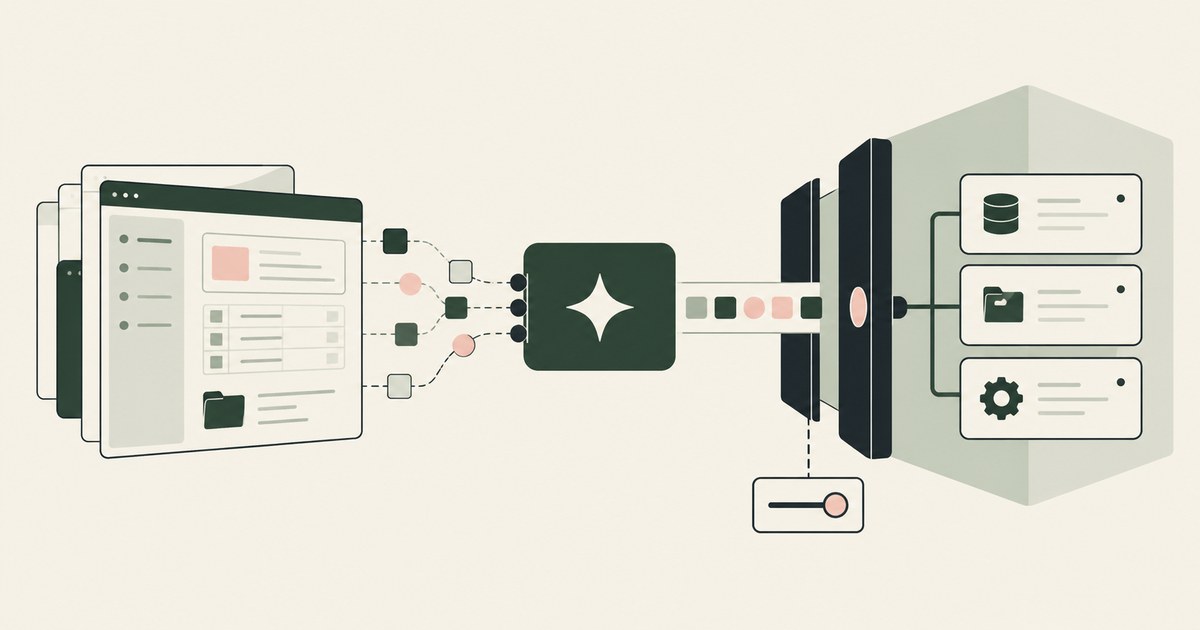
In this page's terms, a headless browser is a browser that runs pages without a screen a person watches, so that a script or an agent can drive it. Browserbase, whose documentation is read below, is infrastructure for running browsers for automation, the first kind, and it is paired with credential handling from 1Password. A protected browser is the second kind. It does what the first does and adds a rendering layer that replaces values with tokens before the agent's view of the page is built, as What Is Render-Layer Tokenization? describes.
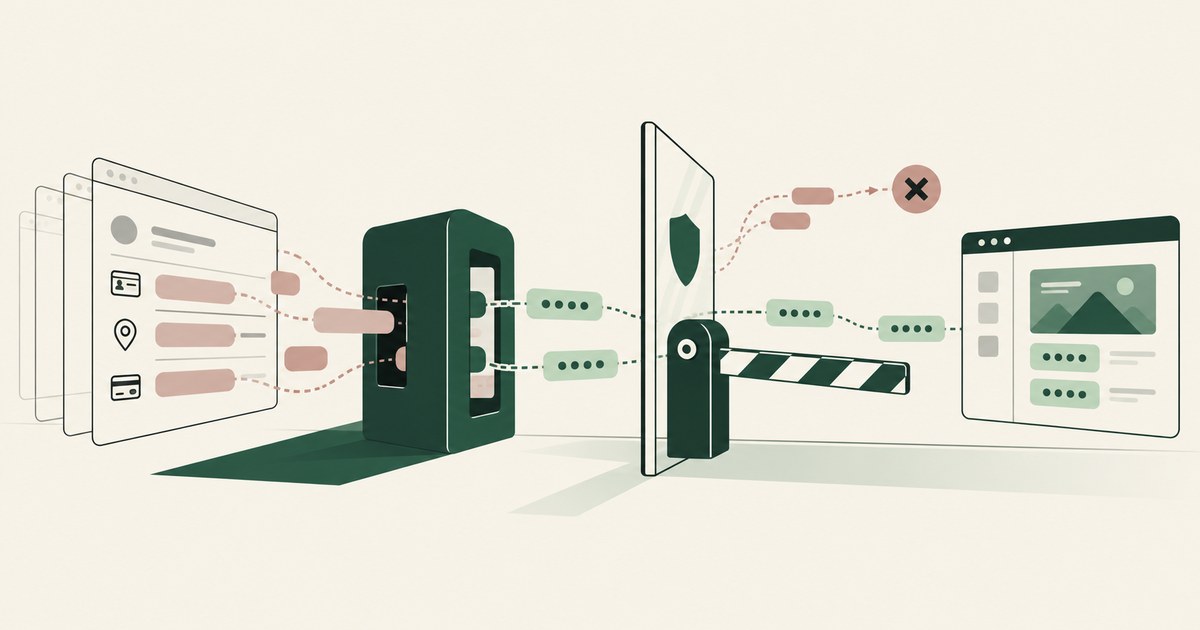
The example record is one page seen both ways: the settings page of a developer console. It shows the account email, the organization name, an API token displayed once and the card on file in a billing panel. Through a headless browser, the model receives each of those values the moment the page renders, whether or not the login was injected. Through a protected browser, the model receives EMAIL_001, ORG_001, TOKEN_001 and CARD_001 in the same positions for the whole run, and the real values reach a destination only when a named person approves the action.
What does a headless browser with credential injection give an agent?
Credential injection solves a real problem: an agent should be able to log in without being handed the password. 1Password and Browserbase describe one design. The release adds that "Credentials are not shared with the LLM or exposed in Browserbase logs and repos," and it gives no technical detail on how injection is implemented (1Password and Browserbase, 2025). It also lists "Human-in-the-loop authorization: Real-time approval prompts via 1Password mobile or desktop," an approval on the use of a credential (1Password and Browserbase, 2025).
Browserbase's own documentation covers the session side. Browserbase's documentation advises applying Contexts to "Store cookies, session tokens, and local storage to prevent repeated logins" and to "Log in once, then reuse the saved authentication state," which concerns the session and not the content of each page (Browserbase, Authentication, 2026). The pattern is common to automation: authenticate once, keep the state, and reuse it.
Read together, these controls act on the login. The credential is kept from the model, a person can approve its use, and the session carries the login forward. What the page shows the model after the login is not described in the pages reviewed. On the example settings page, the model is spared the password and still receives the email, the organization name, the token and the card.
The distinction matters to a buyer because credential injection is easy to mistake for the second kind. Both keep a credential from the model. Injection keeps one credential at one step. Substitution at the render layer keeps every value the policy names, on every page, for the whole run.
What do the vendors themselves say?
The vendor pages below describe how credentials are held, scoped and expired. They are the nearest documented controls to the second kind of browser, and each one stops at the credential. Take each row as a statement and as the question it hands back to the buyer.
| Dimension | Vendor, per its documentation | What a buyer should verify |
|---|---|---|
| Credential lifetime in an agent's environment | HashiCorp's tutorial states that "Token lifetime is reduced from days or weeks to minutes," and its wrapper script "obtains a short-lived delegated RAR token, exports it as VAULT_TOKEN, and launches the agent" (HashiCorp, Secure, 2026). | The raw token sits in the agent process's environment, and the page does not say whether the agent can read it. Ask what the model sees on the page where the token is used. |
| Credential expiry and revocation | HashiCorp's lease documentation states that "All dynamic secrets in Vault are required to have a lease" and that "When a lease is revoked, it invalidates that secret immediately and prevents any further renewals" (HashiCorp, Lease, 2026). | The page gives no default lease length. Ask who sets it, and whether a value shown on a page before expiry has already reached the model. |
| Workload identity | Microsoft's documentation states that "Managed identities eliminate the need for developers to manage these credentials" and that token acquisition "doesn't require any secrets" (Microsoft, 2026). | The design is for workloads on Azure resources, not for a page in a browser. Ask what a rendered page shows once the identity is used. |
Two points follow from the table. Each control governs when a credential exists and who holds it, which is a different question from what a page shows once the credential has been used. And the tutorial's design places the token in the agent's environment for the length of its life, so shortening the life narrows the window without changing what the model reads.
Why does what the model reads matter more than where the browser runs?
Because the failures on record start with page content. The same study demonstrates "how untrusted web content can hijack agent behavior," which places the risk in what a page says to the agent that reads it (Mudryi et al., 2025). A browser with a window and a browser without one hand the model the same text, so the risk does not depend on whether anyone is watching the screen.
The benchmark record points the same way. The Agent Security Bench authors report that "benchmark results reveal critical vulnerabilities in different stages of agent operation" and "limited effectiveness shown in current defenses," without saying which defense performed best or by how much (Zhang et al., 2025). A separate benchmark evaluated "5 prompt injection attacks and 10 defenses with 10 LLMs and 7 tasks," and its authors present it as "a common benchmark for quantitatively evaluating future prompt injection attacks and defenses," though the abstract reports no result figures (Liu et al., 2024). A defense that works only when the model recognizes an attack is a different kind of control from one that removes the value before the model reads it.
Take the example settings page again, and suppose an element on it tells the agent to copy the token into a message. In a headless browser the agent holds the token, and the instruction can be followed. In a protected browser the agent holds TOKEN_001, and the same instruction produces a placeholder that resolves nowhere, because real values resolve only at the approved destination at the moment of an approved action. The key-reading case is covered in Can a Browser Agent Read an API Key It Just Generated?, and the key-management case in How Do You Let an AI Agent Manage API Keys Without Reading Them?.
How can a team tell which kind of browser it has?
Name one agent and one page, and run the page through both paths. Use a settings page with test values: a test email, a test organization, a token created for the test and a test card. Run the task once in a plain automation browser and once in the environment under review, then answer four questions from the transcript and not from the product page. What did the model receive in place of the email, the token and the card? Did the same value carry the same placeholder on every page of the run? Where did the real value go, and who approved the action that sent it? Is there a record, screen by screen, of what the model saw?
The neighboring product classes are often offered as the answer, so check what each covers. CyberArk describes an identity-first approach to agentic AI security built on tight privilege controls, which governs the identity rather than the model's view (RedactSure vs CyberArk: 2026 Comparison & Alternative). CrowdStrike states that Falcon AIDR "extends AI visibility, detection, and response capabilities to Microsoft Copilot Studio and Claude Code," a detection and response control, which is a different class from rewriting a page before the model reads it (RedactSure vs CrowdStrike: 2026 Comparison & Alternative). Akamai completed its acquisition of LayerX on July 2, 2026, and markets the product as "Akamai Workforce Protector (formerly LayerX)," a reminder that product names and owners change and that this page carries its date (RedactSure vs Akamai Workforce Protector: 2026 Comparison & Alternative). How masking affects task completion is covered in Does Masking Data on Screen Break Browser Agents?.
What does a governed environment change?
A governed environment is a control class that acts where a screen is rendered, before any model reads it. Values chosen by policy are replaced with consistent tokens for the whole run, so the model works on placeholders such as EMAIL_001 and TOKEN_001. Real values resolve only at an approved destination, at the moment of an approved action. A named person confirms the tokenization policy and approves each consequential action, including every payment, submission and record change. Every screen as tokens, every action and every approval is written to a record that exports to the organization's own monitoring, so a reviewer can check after the run what the model received on each page and which person approved each release of a real value.
For this page's question it is the property that separates the two kinds. A headless browser, with or without credential injection, delivers the page as rendered and protects the credential. A protected browser delivers a rewritten page and protects every value the policy names. On the example page, the first model holds an email, a token and a card number; the second holds three placeholders and a record of who approved what.
It governs the rendered page and nothing else. A token that a coding agent reads from an environment variable in a shell is outside it, and stays with the sandbox and the credential store the team configures for that agent.
Methodology and limitations
This page rests on three research preprints on browsing agents, prompt injection and agent security, vendor documentation and a press release from 1Password, Browserbase, HashiCorp and Microsoft, one vendor research post from GitGuardian, and existing RedactSure research pages. Vendor pages were read between October 20, 2026 and October 21, 2026, and each Sources line carries the date for its page. Quoted facts are cited to the page that states them, and figures from research posts are cited as reported and not as independently measured. The preprints are cited for what their abstract pages state and not for rates those pages do not give.
RedactSure did not test any of the named products hands-on. The vendor pages concern credential handling, session reuse and token lifetime; what a browser infrastructure product shows the model on a page after login is not described in the pages reviewed, and this page does not claim it is absent. No vendor page reviewed defines the term headless browser, so the definition used here is this page's working definition. Vendor features change, and the page carries its date; a reader should treat a release after that date as unreviewed until the test above is repeated. Statements about RedactSure describe its current design, and RedactSure is deploying now with enterprise and government customers. The example describes a record type, a developer console settings page, and not an organization.
Determinations about whether a browser control meets a contractual, regulatory or audit requirement belong to counsel, assessors and the organization's own security and compliance officers. Nothing here replaces a test of the organization's own agent against a test page, repeated after each release.
What the record shows
The two kinds of browser differ in what stands between the rendered page and the model. A headless browser with credential injection keeps a password out of the model's view at the login and carries the session forward, and the vendors reviewed document that step. A protected browser rewrites the page itself, so the model works on placeholders on every page of the run and real values move only on a named person's approval; RedactSure's environment is built on that second kind. The research record explains why the page matters as much as the login: untrusted page content can hijack an agent, and the benchmarks cited report limited effectiveness for current defenses. To test this, a team should name one agent and one settings page, run it with test values, and write down what the model received in place of the email, the token and the card.
Frequently asked questions
What is the difference between a headless browser and a protected browser for AI agents?
A headless browser runs pages without a screen a person watches, so that a script or an agent can drive it. A protected browser also rewrites the page before the agent's view is built, replacing values with consistent tokens such as TOKEN_001, and releases real values only to an approved destination. The first is defined by how the page is run, the second by what the model is shown. Ask a vendor which of the two it is selling.
Does credential injection make a browser protected?
Not by itself. Credential injection keeps a password or token out of the model's context at the login step. The page that loads afterward is delivered as rendered, so an email, an organization name or a card on file still reaches the model unless a separate control replaces it. A browser is protected in the sense of this page only if it rewrites the page itself, on every page of the run. Test the login and every page that loads after it.
Is a browser without a window safer for an agent?
A window changes who can watch, not what the model receives. A headless browser and a visible one load the same page and hand the model the same text. Safety depends on what the page contains, what the agent is allowed to do with it and whether any control stands between the page and the model. Judge a tool by those three, and treat the absence of a window as a deployment detail that changes cost and scale more than exposure.
What does the model see on a page in a protected browser?
It sees the page's structure and visible text, with each value the policy names replaced by a token: EMAIL_001 for the account email, TOKEN_001 for the API token, CARD_001 for the card on file. The same value carries the same token on every page of the run, so the agent can still compare, copy and fill in fields without holding the originals. The real value is written only at the approved destination, on a named person's approval, and the record keeps the tokenized view of each screen.
Can an agent still leak a value in a protected browser?
Through any route outside the rendered page, yes. A browser control does not govern the terminal, the IDE, the local filesystem, direct API calls or MCP, so a token read from an environment variable in a shell is outside it. Inside the page, a value the policy did not name is not replaced, so the policy itself needs a review. Check what the policy covers, and check the other routes with the controls built for them.
What should a team ask a browser vendor in writing?
Whether the tool injects a credential at the login, rewrites the page, or both; what the model receives on the pages after the login; whether the same value keeps the same placeholder across pages; who approves a submission and where the real value goes; and what record shows each screen as the model saw it. Treat any answer the documentation does not support as unanswered until a run with test values confirms it, and keep the written answers beside that run's transcript.
Related reading
What Is Render-Layer Tokenization? · How Do You Let an AI Agent Manage API Keys Without Reading Them? · RedactSure vs CyberArk: 2026 Comparison & Alternative · RedactSure vs CrowdStrike: 2026 Comparison & Alternative · RedactSure vs Akamai Workforce Protector: 2026 Comparison & Alternative · What Is a Protected Browser for AI Agents? · Does Masking Data on Screen Break Browser Agents? · Can a Browser Agent Read an API Key It Just Generated? · On the RedactSure blog: Your AI Doesn't Need to Know Who You Are · The Two Room Thought Experiment · RedactSure
Sources
Peer-reviewed research and preprints
-
Mudryi, Chaklosh, Wojcik, "The Hidden Dangers of Browsing AI Agents," arXiv:2505.13076 (preprint, May 2025). https://arxiv.org/abs/2505.13076
-
Liu, Jia, Geng et al., "Formalizing and Benchmarking Prompt Injection Attacks and Defenses," arXiv:2310.12815 (preprint; USENIX Security 2024 per authors; arXiv v5 dated 2025-11-12). https://arxiv.org/abs/2310.12815
-
Zhang, Huang, Mei et al., "Agent Security Bench (ASB): Formalizing and Benchmarking Attacks and Defenses in LLM-based Agents," arXiv:2410.02644 (preprint, v4 2025-05-30). https://arxiv.org/abs/2410.02644
Vendor documentation
-
1Password and Browserbase, "Partner to Secure Credential Access for Agentic AI Automation," October 8, 2025 (vendor press release; read October 20, 2026). https://1password.com/press/2025/oct/browserbase-ai-security-partnership
-
Browserbase, "Authentication best practices," Browserbase documentation (vendor documentation; read October 20, 2026). https://docs.browserbase.com/best-practices/authentication
-
HashiCorp, "Secure agent permissions with Vault," Vault tutorial (vendor documentation; read October 21, 2026). https://developer.hashicorp.com/vault/tutorials/enterprise/secure-agent-permissions-with-vault
-
HashiCorp, "Lease, Renew, and Revoke," Vault documentation (vendor documentation; read October 20, 2026). https://developer.hashicorp.com/vault/docs/concepts/lease
-
Microsoft, "Managed identities for Azure resources," Microsoft Learn (vendor documentation; read October 20, 2026). https://learn.microsoft.com/en-us/entra/identity/managed-identities-azure-resources/overview
Industry analysis and press
- GitGuardian, "Yes, GitHub's Copilot can Leak (Real) Secrets," March 27, 2025 (vendor research). https://blog.gitguardian.com/yes-github-copilot-can-leak-secrets/
RedactSure documents
-
RedactSure Research, "What Is a Protected Browser for AI Agents?" (2026). https://redactsure.com/research/what-is-a-protected-browser-for-ai-agents/
-
RedactSure Research, "What Is Render-Layer Tokenization?" (2026). https://redactsure.com/research/what-is-render-layer-tokenization/
-
RedactSure Research, "How Do You Let an AI Agent Manage API Keys Without Reading Them?" (2026). https://redactsure.com/research/how-do-you-let-an-ai-agent-manage-api-keys-without-reading-them/
-
Product behavior described on this page reflects RedactSure's current design. Third-party products are described from their public documentation as read between October 20, 2026 and October 21, 2026. Compliance determinations belong to the organization's counsel.

What Is Render-Layer Tokenization? The Control at the Layer Where the Agent Actually Reads
Render-layer tokenization swaps sensitive values for consistent stand-in tokens such as SSN_001 as the screen renders, before any AI model reads it.
How Do You Let an AI Agent Manage API Keys Without Reading Them?
Swap the key for a token as the dashboard renders it, and resolve the real value in the approved field when a person confirms. Check where keys show.
RedactSure vs CyberArk: 2026 Comparison & Alternative
CyberArk, now Idira, controls which agent and which tool call reach a system, while RedactSure controls what the model reads on the rendered record.
RedactSure vs CrowdStrike: 2026 Comparison & Alternative
CrowdStrike returns allow or block at the point of execution, while RedactSure replaces values on the rendered screen before a model reads it.

RedactSure vs Akamai Workforce Protector: 2026 Comparison & Alternative
Akamai Workforce Protector governs what an agent types, pastes and sends in a browser. RedactSure replaces values on the screen before a model reads it.
What Is a Protected Browser for AI Agents?
A protected browser replaces credentials, personal data and private business data with placeholders before the agent's view is built.
Does Masking Data on Screen Break Browser Agents?
No, not when placeholders are consistent: an agent shown ACCT_001 on every page can correlate it and finish. Losses come from inconsistent placeholders.
Can a Browser Agent Read an API Key It Just Generated?
Yes: the console renders the new key and the agent reads the page. Only a control acting at render time keeps a displayed key from the model.

Your AI Doesn't Need to Know Who You Are
Explore why AI agents can perform sensitive workflows using tokenization while names, account details and other PII stay out of view.

The Two Room Thought Experiment
Explore a thought experiment about AI agents, tokenization and how useful reasoning can be separated from access to sensitive PII.
How RedactSure Keeps Page Values Away From the Model After the Login Succeeds
Credential injection protects the login, but the page that loads afterward arrives as rendered, and the tools reviewed govern only a credential's lifetime, holder or approval.
The environment that enforces this is built by RedactSure, an AI agent controls, governance and data protection company.
Before: the model reads the email, the token and the card number on the settings page, and any of them can leave in a message or a file. Inside the governed environment: it reads EMAIL_001, TOKEN_001 and CARD_001, and the real token is written to a field only on a named person's approval.
RedactSure is deploying now with enterprise and government customers. GitGuardian's test of Copilot found 3.0 valid credentials for one prompt on average.
Everyone else controls where data can go. RedactSure controls what the AI can see.
See it on your own workflow
A headless browser and a protected browser sign in the same way, and the difference is what the model reads afterward. Bring a signed-in task and see, with test values, the settings page as the model receives it. Book a demo