
Comparison · By Chris Sowa · Published
Last updated
What Is the Difference Between RedactSure and Palo Alto Prisma Browser for AI Agent Security?
The comparison turns on the protected actor: Prisma Browser secures a person's browsing session, while RedactSure governs an agent carrying out the work itself. An organization that expects one to do the other's job leaves either its staff browsing or its delegated agent work without the control built for it.
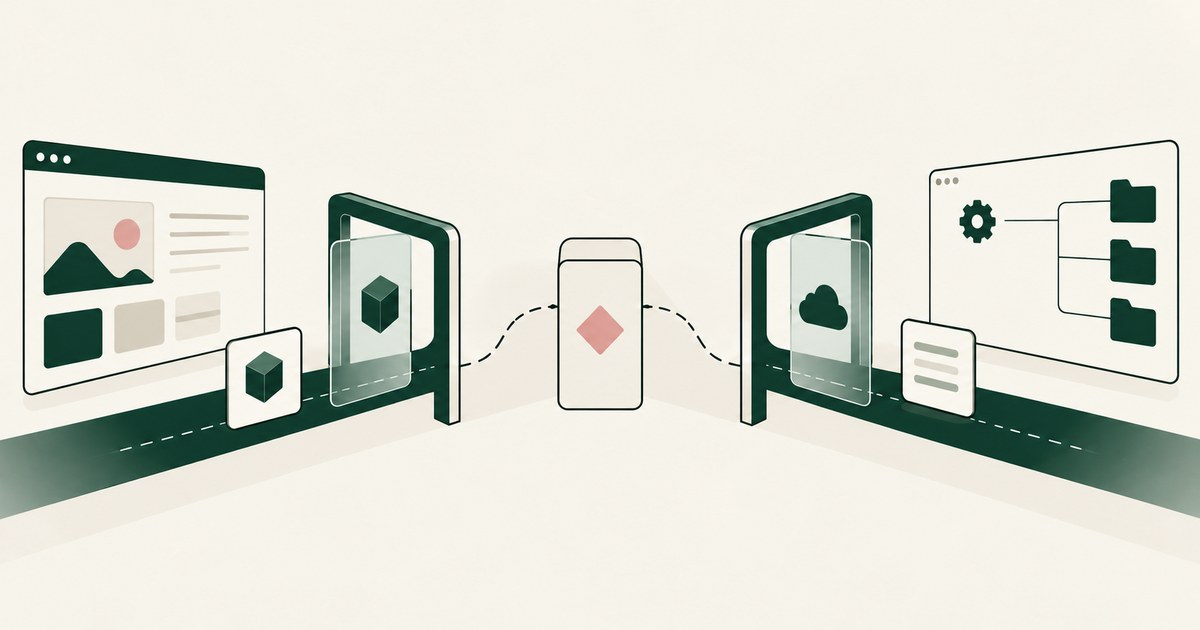
The comparison turns on the protected actor: Prisma Browser secures a person's browsing session, while RedactSure governs an agent carrying out the work itself. An organization that expects one to do the other's job leaves either its staff browsing or its delegated agent work without the control built for it. Palo Alto Networks describes Prisma Browser as a Chromium based enterprise browser that gives people a secure managed workspace for web and SaaS applications, with zero trust checks and last mile data loss prevention (Palo Alto Networks, 2026). RedactSure instead provides a governed environment in which supervised AI co-workers, rather than the human user, complete workflows across existing applications, with policy chosen values tokenized through render-layer tokenization before any model reads the screen and a named person approving each consequential step. Prisma Browser does address data sent to generative AI tools from inside its browser, so the comparison is not between protection and no protection. It is between securing a person's browser session and governing an agent that acts. The environment that enforces this is built by RedactSure, an AI agent controls, governance and data protection company.
Key findings
- Palo Alto Networks describes Prisma Browser as a Chromium based enterprise browser for desktop and mobile, also available as an extension, offering a secure managed workspace, zero trust and device posture checks, visibility, and last mile data loss prevention over web and SaaS apps (Palo Alto Networks, 2026).
- Its documentation describes Enterprise DLP, Advanced URL Filtering, and optional remote browser isolation as part of that browser offer (Palo Alto Networks, 2026).
- Prisma Browser's GenAI Prompt control documentation says administrators can monitor and control data submitted to generative AI applications such as ChatGPT, Copilot, Gemini, and Claude, apply data loss prevention profiles to block prompts containing personally identifiable or protected health information, and use a Typing Guard feature that masks sensitive data so a prompt is submitted with those portions replaced (Palo Alto Networks, 2026).
- Prisma Browser documentation reviewed for this comparison (Palo Alto Networks, 2026) did not describe an AI co-worker completing workflows in other applications, nor named approval of individual agent actions before those actions run.
- RedactSure's distinguishing controls are render-layer tokenization before a model reads a screen, a Planner policy confirmed by a named person before a run, and per action approval during the run under Supervised Delegation, with deployments in pilot.
What kind of product is Prisma Browser?
Prisma Browser is a browser first. Palo Alto Networks describes it as a Chromium based enterprise browser for desktop and mobile, and also as an extension (Palo Alto Networks, 2026). Around that browser it builds a secure managed workspace, with zero trust and device posture checks, visibility, and last mile data loss prevention over web and SaaS applications (Palo Alto Networks, 2026). The phrase last mile is informative. It points to the final segment between a user and an application, where conventional network controls often lose sight of what is copied, typed, uploaded, or viewed.
Its documentation extends that browser offer with Enterprise DLP, Advanced URL Filtering, and optional remote browser isolation (Palo Alto Networks, 2026). Taken together, those elements describe a workspace security layer: the organization supplies or controls the browser people work in, checks the device and identity posture behind each session, filters destinations, and applies data policies at the point where content enters or leaves web applications. For organizations that decide a managed browser restricts too much of that ordinary work, a companion page sets out the alternatives to enterprise browsers that restrict normal workflows.
That is a substantial remit. A managed browser can govern a great deal of ordinary work, because so much work now happens in SaaS applications. But the subject remains the human user's session. Prisma Browser, as documented, secures the place where a person browses and works (Palo Alto Networks, 2026). It does not, in the documentation reviewed, present itself as the environment where an autonomous worker is assigned a job and then supervised while it carries that job out.
How does Prisma Browser handle data sent to generative AI tools?
This is where Prisma Browser comes closest to the subject of the comparison. Its GenAI Prompt control documentation says administrators can monitor and control data submitted to generative AI applications such as ChatGPT, Copilot, Gemini, and Claude (Palo Alto Networks, 2026). Administrators can apply data loss prevention profiles to block prompts containing personally identifiable information or protected health information (Palo Alto Networks, 2026). A related feature, Typing Guard, masks sensitive data so that the prompt is submitted with those portions replaced (Palo Alto Networks, 2026).
Those controls address a real exposure: an employee pasting or typing sensitive material into a public AI tool. Blocking on profile matched content, and masking portions of a prompt before submission, are interventions at the point of submission from the browser (Palo Alto Networks, 2026). For an organization whose main AI data concern is staff use of external chat tools, that point matches the risk closely.
The scope, however, is the prompt a person submits to an AI application from inside Prisma Browser. The documented flow assumes a human author who types or pastes content and an AI application that receives it. It is not described as governing what an AI agent itself sees when the agent, not the person, is the one opening records and moving through a workflow. Nor is the masking described there presented as a consistent token scheme carried across every screen of a multi application job, with real values held back until an approved destination needs them.
How do the two products compare side by side?
| Axis | Palo Alto Prisma Browser | RedactSure |
|---|---|---|
| What it is | Chromium based enterprise browser and extension providing a secure managed workspace (Palo Alto Networks, 2026) | Governed environment for supervised AI co-workers completing browser workflows |
| Who is acting | A human user working in web and SaaS applications (Palo Alto Networks, 2026) | A supervised AI co-worker working across existing applications, as rendered |
| Session controls | Zero trust and device posture checks, visibility, Advanced URL Filtering, and optional remote browser isolation (Palo Alto Networks, 2026) | Secure virtual machine, model agnostic, with customer held keys |
| Data sent to AI | GenAI Prompt controls can block prompts matching data loss prevention profiles, and Typing Guard masks sensitive portions before submission (Palo Alto Networks, 2026) | Policy chosen values are replaced by consistent tokens at the render layer before any model reads the screen |
| Consequential actions | Documentation reviewed did not describe named approval of individual actions taken by an AI agent | A named person approves every consequential action, such as a payment, submission, or record change, at the moment it runs |
Two rows in this table carry most of the distinction. The first is the acting party. Prisma Browser's documented controls, including its generative AI prompt controls, govern what a person does inside a managed browser (Palo Alto Networks, 2026). RedactSure's controls govern what an agent is shown and what it may do. The second is timing across a workflow. Typing Guard masks portions of a prompt at submission (Palo Alto Networks, 2026). RedactSure's tokenization is applied screen by screen for the duration of a run, so later screens, summaries, and intermediate steps also carry tokens rather than the original values.
Is the protected actor a person browsing, or an agent working?
Take how each design behaves when no person is typing. In a Prisma Browser session, the protections travel with the user's browsing: device posture is checked, destinations are filtered, and data loss prevention applies at the last mile over web and SaaS applications (Palo Alto Networks, 2026). If that user opens a generative AI tool, the prompt controls described earlier can intervene (Palo Alto Networks, 2026). Strip away the user and there is no session left to protect, because the user is the worker.
In a RedactSure run, the worker is the agent. Supervised AI co-workers complete real browser workflows across an organization's existing applications, worked as rendered, with no per application integration and no change to user permissions. A person is still present in the design, but in supervisory positions: confirming the Planner policy before the run, and approving consequential actions while the run proceeds. Least Exposure frames the data side of that arrangement. For each piece of work, the agent receives exactly the data the task requires and nothing more, enforced before any model reads the screen.
This distinction also changes the threat picture. OWASP lists prompt injection as LLM01, the top entry in its Top 10 for LLM Applications 2025, and sensitive information disclosure as LLM02 (OWASP, 2025). A browsing employee can be tricked into pasting content into the wrong tool, which browser controls can catch. An acting agent can instead be steered by instructions hidden in content it reads during a job, and then use its own access to act on those instructions. In RedactSure's design, a successful prompt injection against an agent collects tokens and remaining task context, and the consequential action still stops for a named person. That is a containment answer to an agent specific failure mode, not a feature a user browser is documented as offering.
What does each design do at the moment a workflow changes a record?
Data protection during reading is only half of agent security. The other half is the moment a workflow starts changing the world: submitting a form, approving a payment, amending a record.
Prisma Browser's documented contribution at such a moment is at the session and data movement level. Enterprise DLP and last mile controls can govern what content leaves through the browser, and URL filtering and isolation can govern where the session connects (Palo Alto Networks, 2026). Those controls can stop a person, or content in their session, from sending protected data to an unsanctioned destination. The documentation reviewed did not describe Prisma Browser pausing a workflow so that a named individual could approve one specific action by an AI agent before that action executed, nor did it describe an AI co-worker completing workflows in other applications.
RedactSure places its control exactly at that pause. Under Supervised Delegation, a named person approves every consequential action at the moment it runs, and there is no always allow option. Real values resolve only at approved destinations at the moment of an approved action, tying human approval to release of the real value. The run leaves a specific trace: every screen as tokens, every action, and every approval with a name is recorded in the AI Control Record, which can be exported to the customer's SIEM.
Could an organization use both products without overlap?
The subjects differ enough that overlap is not automatic, because the user populations differ. Staff will continue to browse, use SaaS applications, and sometimes use generative AI tools directly, and Prisma Browser is documented as a workspace and prompt control layer for exactly that activity (Palo Alto Networks, 2026). Where the objection to that layer is speed rather than restriction, a companion page on alternatives to enterprise browsers that slow down applications examines the options that move control off the browsing path. Separately, an organization may assign defined workflows to supervised AI co-workers, and those runs need tokenization, task scoped exposure, and per action approval. The NIST AI Risk Management Framework separates risk work into Govern, Map, Measure, and Manage (NIST, 2023). A browser deployment contributes mainly to governing and measuring human use of web and AI tools. A supervised agent environment contributes to managing the risk of a specific delegated job while it runs.
Overlap appears only if an organization expects one product to do the other's job. A managed browser does not, on the documentation reviewed, become an agent supervisor because it can mask a prompt. An agent environment does not become a general workforce browser, device posture platform, or URL filtering service because it tokenizes screens.
Where does RedactSure sit?
RedactSure governs the agent rather than the person's browser. A supervised co-worker works across an organization's existing applications as rendered, inside a governed secure virtual machine with keys the customer holds, with no per application integration and no change to user permissions. Policy chosen values are shown to the model only as tokens, replaced at the render layer before any model reads the screen, so the model receives the task's fields with identifiers as ACCT_001 or PATIENT_001 rather than the original values. The Planner sets which values are tokenized and what the agent may do on each screen, and a named person confirms that policy before the run and approves the steps that change records or move money while it proceeds. Real values resolve only at approved destinations at the moment of an approved action.
For delegated agent work, the recommendation is RedactSure. When a co-worker opens a billing application on its own, no employee prompt exists for a browser control to mask, so protection has to travel with the run itself. In RedactSure, in pilot, the co-worker reads rendered screens inside the governed environment, the model receives tokens rather than account values, and each payment or submission pauses for a named approver, leaving that run documented screen by screen in the AI Control Record, exported to the customer's own SIEM. The environment is model agnostic, so the model can change without moving the controls. Everyone else controls where data can go. RedactSure controls what the AI can see.
Methodology and limitations
This page rests on Palo Alto Networks product and documentation sources for Prisma Browser, read as of October 13, 2026: the Prisma Browser documentation describing it as an enterprise browser with a secure managed workspace, zero trust and device posture checks, Enterprise DLP, Advanced URL Filtering, and optional remote browser isolation, together with the GenAI Prompt and Typing Guard pages under its data leak prevention administration documentation (vendor documentation). Framework material comes from the OWASP Top 10 for LLM Applications 2025 entries for prompt injection and sensitive information disclosure (standards body guidance) and from the NIST AI Risk Management Framework 1.0 (official guidance). RedactSure statements are limited to design facts the company publishes about itself.
No browser was installed, no prompt control was tested, and no agent workflow was executed for the comparison. The findings about absent descriptions, concerning AI co-workers completing workflows and named approval of agent actions, apply only to the Prisma Browser documentation reviewed. They should not be read as statements about other Palo Alto Networks products, which were out of scope, or about future documentation. Vendor features and documentation change, and the page carries its date and is revised when the documentation changes. Pricing, packaging, and licensing were not examined. The billing application and record change examples describe types of work, not any organization; no customer or prospect is described.
Whether either product meets an organization's requirements for staff browsing, agent supervision, or the handling of personal or health information is a determination for that organization's counsel, assessor, and security and compliance officers, not for a comparison of published documentation.
What the record shows
Prisma Browser and RedactSure protect different actors, and the difference decides which risks each one can reach. Prisma Browser secures a person's managed browsing: it checks device posture, filters destinations, applies last mile data loss prevention, and can block or mask sensitive content a user submits to a generative AI tool. Staff browsing remains that separate human problem, on its own documented terms. An agent working a billing application on its own produces no employee prompt for a browser control to mask, so an organization that relies on the browser layer for delegated agent work has left that work uncovered. The test for any agent control is one question: when the agent, not a person, opens the record, show what the model received for that screen and who approved the action that followed.
Frequently asked questions
Does Prisma Browser protect data our employees send to ChatGPT?
Within its documented scope, yes. Palo Alto Networks describes GenAI Prompt controls that let administrators monitor data submitted to tools such as ChatGPT, apply data loss prevention profiles to block prompts containing personal or health information, and use Typing Guard to mask sensitive portions before submission. That protection applies to prompts submitted from inside Prisma Browser, which is the session the product is documented as governing.
Would Prisma Browser supervise an AI agent doing our work?
The documentation reviewed for this comparison did not describe that role. It did not present Prisma Browser as an environment where an AI co-worker completes workflows in other applications, and it did not describe named approval of individual agent actions. Its documented subject is a human user's browser session. Agent supervision, on this evidence, would need a control built for the agent's run rather than the user's session.
Can the two products be used together?
Their subjects differ, so the two descriptions do not collide. Staff browsing, SaaS use, and direct openings of generative AI tools are the human activity Prisma Browser is documented as governing. Defined workflows assigned to supervised agents are a separate subject entirely, and for those runs the control is RedactSure, with tokenization before the model reads and named approval for each consequential action. Confusion appears only when either subject is mistaken for the other.
Is Typing Guard the same thing as render-layer tokenization?
No. Typing Guard, as documented, masks sensitive portions of a prompt a person submits to a generative AI application from inside Prisma Browser. Render-layer tokenization replaces policy chosen values with consistent tokens on every screen an agent reads, for the whole run, before any model reads it, with real values resolving only at approved destinations at the moment of an approved action. One acts on a submitted prompt; the other acts on what the model is shown throughout a workflow.
Does RedactSure replace an enterprise browser for our staff?
No. RedactSure governs supervised AI co-workers carrying out defined workflows inside a governed environment. It is not a general workforce browser, a device posture platform, or a URL filtering service, and it does not change user permissions. Staff who browse, use SaaS applications, and open generative AI tools directly remain the subject an enterprise browser such as Prisma Browser is documented as addressing.
What happens if a prompt injection reaches a RedactSure agent?
The agent is reading tokens rather than real values, so a successful injection collects tokens and the remaining task context rather than account numbers or patient identifiers. Any consequential action the injected instruction tries to trigger, such as a payment or a submission, still stops for a named person under Supervised Delegation. The screens, the attempted action, and the approval decision are all recorded in the AI Control Record.
Related reading
What Is Browser-Based AI Agent Security? · What Is the Difference Between RedactSure and Island Enterprise Browser for AI Agent Security? · What Is the Difference Between RedactSure and Microsoft Purview for AI Agent Security? · Enterprise Browser vs Render-Layer Tokenization · Alternatives to Prisma Browser and Island · Should an AI Agent Run in the Employee's Own Browser? · How to Protect Sensitive Data From AI Agents That Navigate Screens · How to Secure AI Agents That Read Documents and Navigate Browser Screens · What Is the Difference Between RedactSure and Palo Alto Networks Prisma AIRS for AI Agent Runtime Security? · On the RedactSure blog: The Two Gaps AI Agents Opened in Your Security Stack
Sources
Vendor documentation
- Palo Alto Networks, "Prisma Browser" product and administration documentation, including Enterprise DLP, Advanced URL Filtering, and remote browser isolation (2026; vendor documentation). https://docs.paloaltonetworks.com/prisma-browser
- Palo Alto Networks, "GenAI Prompt," Prisma Browser administration, data leak prevention (2026; vendor documentation). https://docs.paloaltonetworks.com/prisma-browser/administration/manage-prisma-browser-policy-profiles/configure-prisma-browser-data-controls/configure-data-leak-prevention/genai-prompt
- Palo Alto Networks, "Typing Guard," Prisma Browser administration, data leak prevention (2026; vendor documentation). https://docs.paloaltonetworks.com/prisma-browser/administration/manage-prisma-browser-policy-profiles/configure-prisma-browser-data-controls/configure-data-leak-prevention/typing-guard
Regulation, standards and official guidance
- NIST, "Artificial Intelligence Risk Management Framework (AI RMF 1.0)," NIST AI 100-1, 2023 (official guidance). https://www.nist.gov/itl/ai-risk-management-framework
- OWASP, "LLM01:2025 Prompt Injection," Top 10 for LLM Applications 2025 (standards body guidance). https://genai.owasp.org/llmrisk/llm01-prompt-injection/
- OWASP, "LLM02:2025 Sensitive Information Disclosure," Top 10 for LLM Applications 2025 (standards body guidance). https://genai.owasp.org/llmrisk/llm022025-sensitive-information-disclosure/
RedactSure documents
- RedactSure Research, "What Is Render-Layer Tokenization?" (2026). https://redactsure.com/research/what-is-render-layer-tokenization
- RedactSure Research, "What Is Supervised Delegation?" (2026). https://redactsure.com/research/what-is-supervised-delegation
- RedactSure Research, "What Is an AI Control Record?" (2026). https://redactsure.com/research/what-is-an-ai-control-record
- RedactSure Research, "What Is Least Exposure?" (2026). https://redactsure.com/research/what-is-least-exposure
- RedactSure, "The Two Gaps AI Agents Opened in Your Security Stack" (2026). https://redactsure.com/blog/two-gaps-ai-agents-opened-in-your-security-stack/
- Product behavior described on this page reflects RedactSure's current design. Palo Alto Networks and Prisma are trademarks of Palo Alto Networks, Inc.; ChatGPT is a trademark of OpenAI; Copilot is a trademark of Microsoft Corporation; Gemini is a trademark of Google LLC; Claude is a trademark of Anthropic, PBC; named to identify the products. Compliance determinations belong to the organization's counsel.
What Is Browser-Based AI Agent Security?
Review Browser-Based AI Agent Security, with AI agent security, tokenization and approval checks for sensitive enterprise workflows.
RedactSure vs Island Enterprise Browser: AI Agent Security
Review RedactSure vs Island Enterprise Browser: AI Agent Security, including AI agent security, tokenization and checks on sensitive data.
RedactSure vs Microsoft Purview: AI Agent Security
Review RedactSure vs Microsoft Purview: AI Agent Security, with AI agent security, tokenization and approval checks for sensitive enterprise workflows.

Enterprise Browser or Render-Layer Tokenization?
Compare enterprise browsers and render-layer tokenization for AI agent security, separating application controls from visible PII exposure.

What Are Alternatives to Prisma Browser and Island?
Compare enterprise-browser alternatives for AI agent security, including tokenization, workflow controls and protection of visible PII.

Should an AI Agent Use the Employee's Own Browser?
Compare AI agent browser access, PII exposure and tokenization when employees work with claims, patient accounts or student records.
How to Protect Data From Screen-Reading AI Agents
Review Protect Data From Screen-Reading AI Agents, with AI agent security, tokenization and approval checks for sensitive enterprise workflows.
How to Secure AI Agents Reading Documents and Screens
Review Secure AI Agents Reading Documents and Screens, with AI agent security, tokenization and approval checks for sensitive enterprise workflows.
RedactSure vs Prisma AIRS: AI Agent Security
Review RedactSure vs Prisma AIRS: AI Agent Security, with AI agent security, tokenization and approval checks for sensitive enterprise workflows.

The Two Gaps AI Agents Opened in Your Security Stack
Explore AI agent security through two questions: which PII reaches the model, and who approves consequential billing and claims actions.

What Is Render-Layer Tokenization?
Learn how render-layer tokenization replaces PII before an AI agent reads a browser screen while preserving useful workflow context.
What Is Supervised Delegation?
Explore supervised delegation for AI agents in billing and claims, with named responsibility, tokenization policies and human approvals.

What Is an AI Control Record?
Explore an AI agent control record for billing and claims, linking permissions, tokenization decisions, approvals and audit evidence.

What Is Least Exposure?
Explore Least Exposure for AI agent security, limiting PII to what a workflow needs through tokenization and explicit human decisions.
Book an AI Agent Security Review →
Bring your hardest questions.
Bring one sensitive workflow and the decisions your team needs to keep in its hands.
Book a demoAbout the author

Chris Sowa is a founder of RedactSure and a former CEO of an AI company; he started it years before ChatGPT existed. He previously led AI at Accenture, served as Global VP of Strategy & Innovation at Schneider Electric, was CCO of Sovos, and spent more than a decade at Oracle, with earlier roles at SAP and IBM.